
Details of Counter
About meter counter
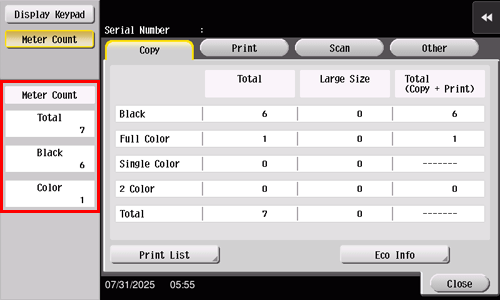
Check the total number of pages printed on this machine.
Item | Description |
|---|---|
[Total] | Allows you to check the total number of printed pages. |
[Black] | Allows you to check the total number of pages printed in Black mode. |
[Color] | Allows you to check the total number of pages printed in Single Color, 2 Color, or Full Color modes. |
About copy counter
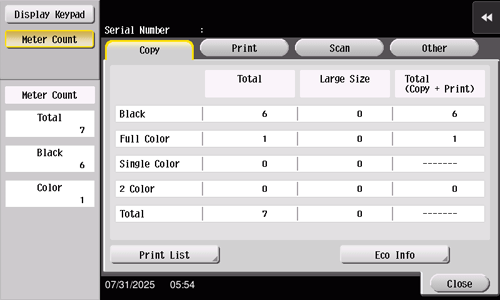
Enables you to check the total number of pages copied. (This value includes the number of pages on which the number of pages list-output in Administrator Settings.)
Item | Description |
|---|---|
[Black] | [Total]: Indicates the total number of pages copied in Black mode. [Large Size]: Indicates the total number of pages copied on large-size paper in Black mode. [Total (Copy + Print)]: Indicates the total number of pages copied in Black mode and that of pages printed in Black mode through a computer. |
[Full Color] | [Total]: Indicates the total number of pages copied in full color. [Large Size]: Indicates the total number of pages copied on large-size paper in full color. [Total (Copy + Print)]: Indicates the total number of pages copied in full color and that of pages printed in full color through a computer. |
[Single Color] | [Total]: Indicates the total number of pages copied in Single Color mode. [Large Size]: Indicates the total number of pages copied on large-size paper in Single Color mode. |
[2 Color] | [Total]: Indicates the total number of pages copied in 2 Color mode. [Large Size]: Indicates the total number of pages copied on large-size paper in 2 Color mode. [Total (Copy + Print)]: Indicates the total number of pages copied in 2 Color mode and that of pages printed in 2 Color mode through a computer. |
[Total] | [Total]: Indicates the total number of pages copied in all color modes. [Large Size]: Indicates the total number of pages copied on large-size paper in all color modes. |

Tips
- [Large Size] is not counted in the initial state. For details on settings for counting [Large Size], contact your service representative.
About printer counter
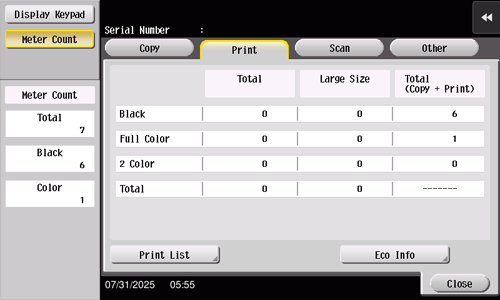
Check the total number of pages printed through a computer.
Item | Description |
|---|---|
[Black] | [Total]: Indicates the total number of pages printed in Black mode. [Large Size]: Indicates the total number of pages printed on large-size paper in Black mode. [Total (Copy + Print)]: Indicates the total number of pages copied in Black mode and that of pages printed in Black mode through a computer. |
[Full Color] | [Total]: Indicates the total number of pages printed in full color. [Large Size]: Indicates the total number of pages printed on large-size paper in full color. [Total (Copy + Print)]: Indicates the total number of pages copied in full color and that of pages printed in full color through a computer. |
[2 Color] | [Total]: Indicates the total number of pages printed in 2 Color mode. [Large Size]: Indicates the total number of pages printed on large-size paper in 2 Color mode. [Total (Copy + Print)]: Indicates the total number of pages copied in 2 Color mode and that of pages printed in 2 Color mode through a computer. |
[Total] | [Total]: Indicates the total number of pages printed in all color modes. [Large Size]: Indicates the total number of pages printed on large-size paper in all color modes. |
Tips
- [Large Size] is not counted in the initial state. For details on settings for counting [Large Size], contact your service representative.
About scan counter
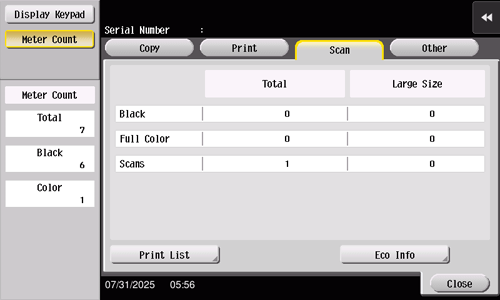
Check the total number of original pages scanned in Scan mode as well as the total number of printed pages.
Item | Description |
|---|---|
[Black] | [Total]: Indicates the total number of pages printed in Black mode from the original scanned in Scan mode. [Large Size]: Indicates the total number of pages printed in Black mode on large-size paper from the original scanned in Scan mode. |
[Full Color] | [Total]: Indicates the total number of pages printed in full color from the original scanned in Scan mode. [Large Size]: Indicates the total number of pages printed in full color on large-size paper from the original scanned in Scan mode. |
[Scans] | [Total]: Indicates the total number of original pages scanned in Scan mode. [Large Size]: Indicates the total number of large-size original pages scanned in Scan mode. |
Tips
- [Large Size] is not counted in the initial state. For details on settings for counting [Large Size], contact your service representative.
About other counters
Check the total number of scanned and printed original pages, total number of printed sheets, total number of pages printed on both sides, and the total number of printed pages regardless of functions.
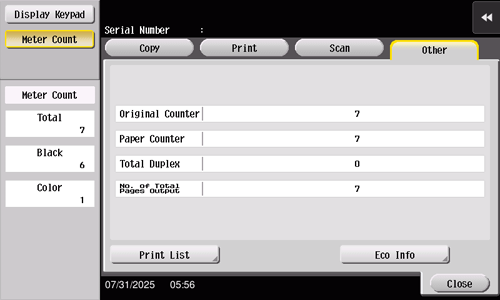
Item | Description |
|---|---|
[Original Counter] | Allows you to check the total number of original pages that are scanned and printed in each mode.
|
[Paper Counter] | Allows you to check the total number of sheets that are printed in each mode.
|
[Total Duplex] | Allows you to check the total number of pages printed on both sides. |
[No. of Total Pages Output] | Allows you to check the total number of printed pages. |
 in the upper-right of a page, it turns into
 and is registered as a bookmark.