
Sending
Sending (basic operation flow)
This section describes how to perform the scan transmission when using the Enlarge Display function.
1
Load the original.
2
Tap [Scan] on the main menu of classic style.
3
Tap [Enlarge Display] in the side menu.
4
Specify the destination.
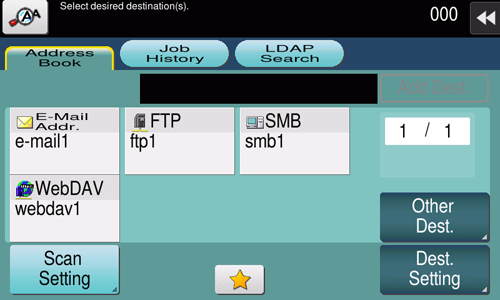
For details on how to specify a destination, refer to Specifying a Destination.
If [Dest. Settings] is tapped, you can view the list of the selected destinations.
5
When necessary, tap [Scan Settings] to configure option settings of the scan transmission.
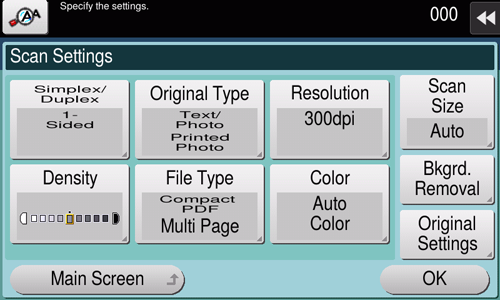
For details on option settings, refer to Scan Transmission Option Settings.
6
Use the Start key to start transmission.
Using the Stop key enables you to stop scanning the original. A list of the currently stopped jobs is displayed. To stop transmission, select the target job from the list, and delete it.
Sending after recalling the program
Program is a function to register a combination of frequently used option settings as a recall key. For transmission, recall the program with a single touch of a button on the main screen of Enlarge Display.
The program must be registered on the normal screen in advance.
1
Load the original.
2
Tap [Scan] on the main menu of classic style.
3
Tap [Enlarge Display] in the side menu.
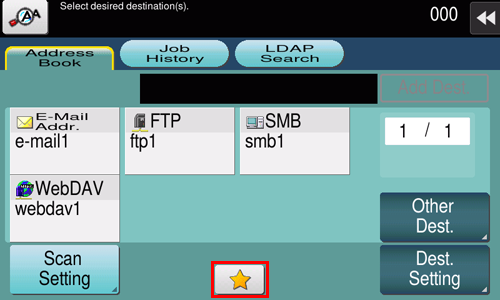
4
Tap the icon to recall the program.
5
Select the program you want to recall, and tap [OK].
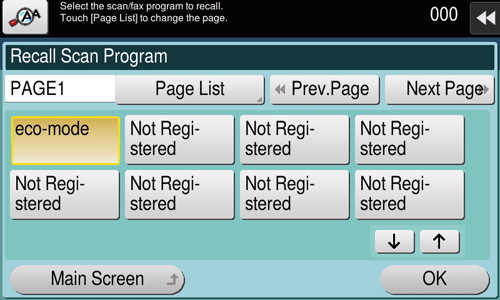
6
Check that the setting has been reflected.
7
Specify a destination if no destination is registered in Program.
For details on how to specify a destination, refer to Specifying a Destination.
8
Use the Start key to start transmission.
 in the upper-right of a page, it turns into
 and is registered as a bookmark.